

Jamf Solutions Simplify Apple device management and security.
Enterprise-secure solutions with consumer-simple workflows.Establish Trusted Access for every user and device.
Whether you need a specific workflow or the full power of Trusted Access, you’ve come to the right place.Zero-touch deployment
Deploy devices to any employee, anywhere.Integrate Jamf with Apple deployment programs — Apple Business Manager or Apple School Manager — to automate enrollment and configuration for a scalable, zero-touch experience with each shrink-wrapped box, personalized for each user.
With managed zero-touch deployment program solutions, users have the same technology experience with a company device that they have on their personal Apple devices.
Mobile Device Management (MDM): Apple MDM Solution
Jamf's Apple MDM solution provides what you need to manage settings and configurations at scale and streamline secure device deployments that simplify the user experience.
But that’s just the start. See how Jamf helps organizations manage Apple hardware from shrink wrap to end-of-life.

App Management
Secure workflows manage all applications in your environment.Unlock the power of apps for your users and any device. Jamf's Apple MDM solution deploys apps, runs install and patch workflows, and has the flexibility to upgrade systems and apps when you’re ready. With Jamf, you can choose your own app management path, create and maintain custom titles for your organization, and simplify the management task as well as the end-user experience.
Inventory Management
Know everything you can about your fleet. Using Jamf for your Apple inventory software solution means you can automatically collect user hardware, software and device security data or customize inventory specifications.
With smart targeting and app reporting, not only can you automate and customize management tasks or updates to specific individuals or groups of users, you can view, report on and ensure actions are taken to enforce user and device compliance.
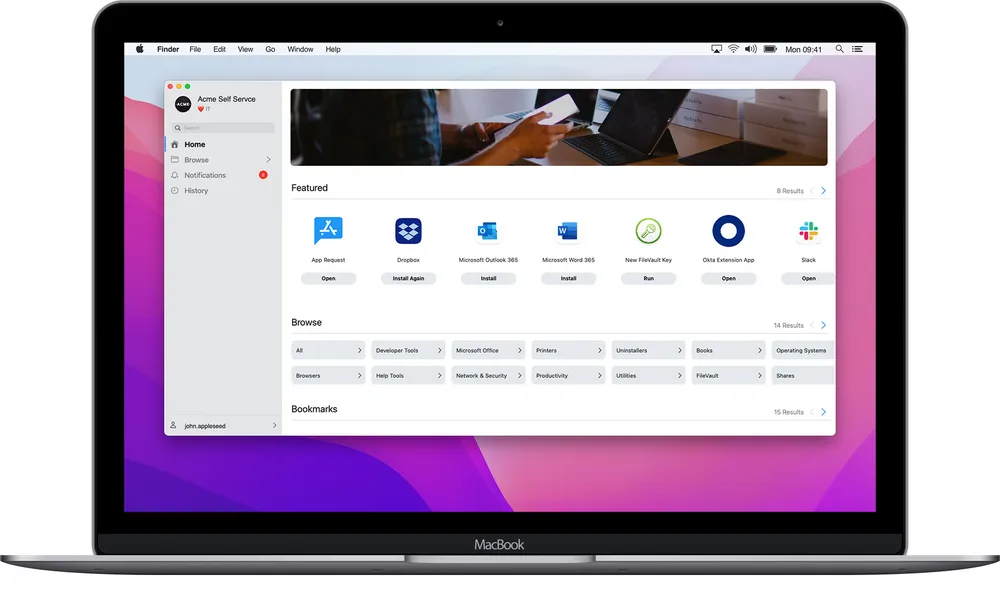
Self Service
Self-service online app catalogEmpower users with instant resource access and reap the benefits:
-
Reduced common IT tickets
-
Productive end users
-
Curated settings and apps
-
Alerts to users for updates and required actions
-
A custom, branded portal
Experience the efficiency of Jamf Self Service, which eliminates many routine IT tasks while keeping users connected and productive.

Identity and Access Management
Connect trusted users to the right resources without sacrificing safety or privacy.Streamline user account creation, login and authentication using a single cloud-identity username and password - without binding to active directory. Eliminate password-related tickets with either a passwordless workflow using iPhone Face ID biometrics or password synchronization with your IDP provider.
Endpoint Protection
Ultimate protection for organizational and personal data.Minimize risk by actively and automatically hunting, detecting, monitoring, remediating and defending against known and unknown threats without disrupting end-user productivity.

Threat Prevention and Remediation
Proactively protect users and your organization from malware and threats.Protect your organization’s iOS devices and users with not only the Apple-native security features but also a prevention, detection and remediation solution that grows with you to adapt to the threat landscape of today and tomorrow.

Content Filtering and Safe Internet
Privacy-focused content filtering protects users.From non-productive content to risky, or even harmful, internet surfing, it’s possible to control what kind of content is accessed on your devices while ensuring that your users’ personal data is not inspected. See what’s possible for work devices and in school settings with Jamf.
Zero Trust Network Access
Embrace modern identity solutions for enhanced security.Ensure only trusted users on sanctioned, safe devices are authorized to access work apps and data with a Zero Trust Network Access (ZTNA) solution. Modern remote access that is purpose-built for Apple using native frameworks along with access policies and dynamic risk monitoring work together to connect and protect your organization.
Security Visibility and Compliance
Stream real-time accurate audit and compliance data.Minimize your organization’s non-compliance exposure, meet — and even exceed! — compliance auditing requirements, and have what you need to report on security benchmark compliance and other organization requirements.